



Learn and master Clay with Clay university
Featured in Clay University
Building Your Audiences
You should have your CRM connected and your records in Audiences. Let's put that data to work.
📋 Everything Starts with Two Global Lists
Everything starts with two global lists in Audiences: All People and All Companies.
Every imported record lands in one of these lists. All People holds contacts and leads. All Companies holds accounts.
Key concept: All People or All Companies is your entire database. An audience is a cut of it.
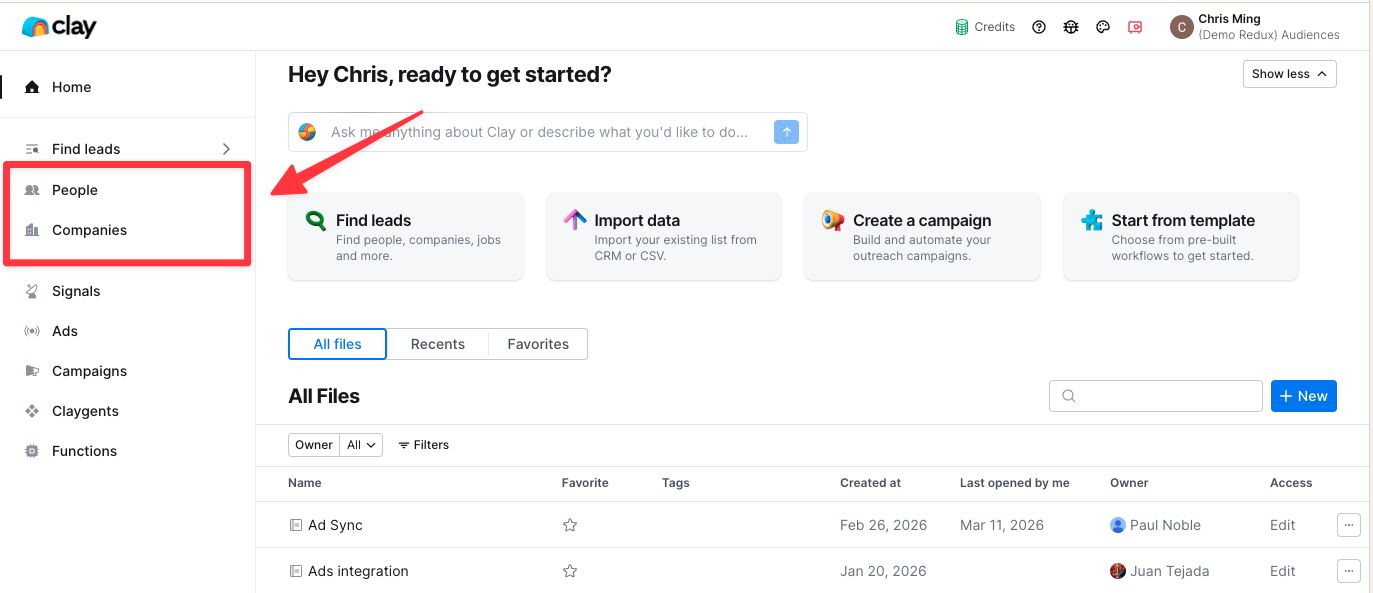
Audiences are filters that sit on top of these global lists. When building an audience, you define a slice of the total populationthat meets specific conditions.
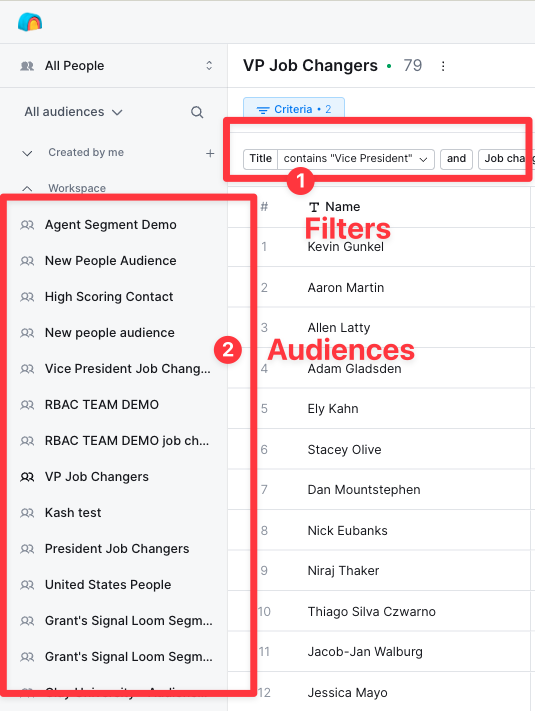
A single contact exists once in All People but can appear in multiple audiences. One person could qualify for high-intent accounts, re-engagement, and competitive displacement segments; they're not being copied, just filtered differently.
Every use case in this course builds on audiences, so understand this foundation before continuing.
🔍 Adding Records from Clay's Find People and Find Companies
Step 1: Run Your Search
Navigate to Find People or Find Companies and build your search using Clay's filters. For example: construction business owners in Omaha, or VPs of sales at Series B companies.
Step 2: Save to Audiences
Click "Save to Audiences." This sends your results into Audiences, but not into All People yet.
Step 3: Review in Draft Mode
Your results enter draft mode first for review and refinement before committing.
You can apply filters at this stage; perhaps filtering to specific job titles or companies above a certain headcount.
You can also enrich records before committing. Run enrichments in draft mode first, then filter based on those results to decide which records to keep.
Step 4: Commit to Audiences
Once satisfied, click "Commit." Your filtered results are added to All People or All Companies.
🚫 What About Duplicate Records?
Clay uses LinkedIn URL as the primary match key to prevent duplicates. Only new records that don't exist in All People or All Companies are added during commit.
🎛️ How Filters Work: Combining Three Data Types
Audiences use AND and OR filter logic across three data types:
1️⃣ CRM fields: Account owner, deal stage, lead status, account type, and custom fields from Salesforce.
2️⃣ Clay enrichment data: Firmographics like company size, industry, revenue, plus contact data like work email, phone number, and tech stack.
3️⃣ Clay signals: Real-time triggers like job changes, funding rounds, and hiring spikes.
Unlike standard CRM lists that only filter Salesforce data, audiences combine first- and third-party data in one filter.
Example: Target contacts where their company is B2B, has 1,000+ employees, and posted roles in the last 30 days. One audience, three data types.
⚙️ Automatic Enrichment When Records Enter Audiences
Clay enriches records when they enter audiences. This is configured per audience to tailor enrichment to each audience's needs.
Choose which fields to fill:
- Prospecting audiences might need work email and phone number
- Account-based audiences might prioritize firmographics
- Signal-driven audiences might focus on job changes or funding history
Set data quality thresholds to determine if records proceed after enrichment. Common setup: only continue if valid work email was found. Records without verified emails stay in the audience but don't move to actions.
Enrichment runs continuously. Clay keeps data fresh as job titles change, headcount thresholds shift, or new phone numbers appear.
Future records that qualify get enriched automatically. New contacts imported next week that meet conditions enter the audience, get enriched, and trigger actions with no manual intervention.
🏗️ The Architecture That Enables Plays
Remember, it’s that IEAE framework that enables teams to build plays off of Audiences:
- Import / Audience is the trigger
- Enrichment prepares your data
- Actions are the output
- Export syncs back with your system of record
🚀 What's Next
In the next lessons, you'll see complete use cases to start building your own plays with Audiences.
