



Learn and master Clay with Clay university
Featured in Clay University
Deep Dive: Clay Chrome Extension
🕸️ Unleashing the Power of Clay's Chrome Extension
When it comes to gathering structured data from the web, Clay's Chrome extension is a game-changer. We've designed this tool to help you effortlessly scrape web pages and import that valuable information directly into your Clay tables. Today, we're excited to walk you through how to leverage this powerful feature to streamline your data collection process.
🔍 Identifying Scrape-Friendly Pages
Before we dive into the nitty-gritty of using the extension, it's important to understand that some web pages are more scrape-friendly than others. We've found that pages with data presented in a tabular format, like our experts directory, are particularly easy to target. Why? Because the HTML tags for this type of data are typically structured in a table format, making extraction a breeze.
That said, don't be discouraged if you encounter pages with less structured lists. While these might require a bit more finesse, our Chrome extension is up to the task. We'll show you how to develop custom recipes for these trickier scenarios.
🚀 Getting Started with the Clay Chrome Extension
When you click into the Clay Chrome extension, you'll notice its intelligent auto-detect feature. This nifty function attempts to identify any lists on your page automatically. In many cases, like with our experts directory, you'll find that the extension has already detected and prepared to scrape all the relevant entries—78 in this particular instance.
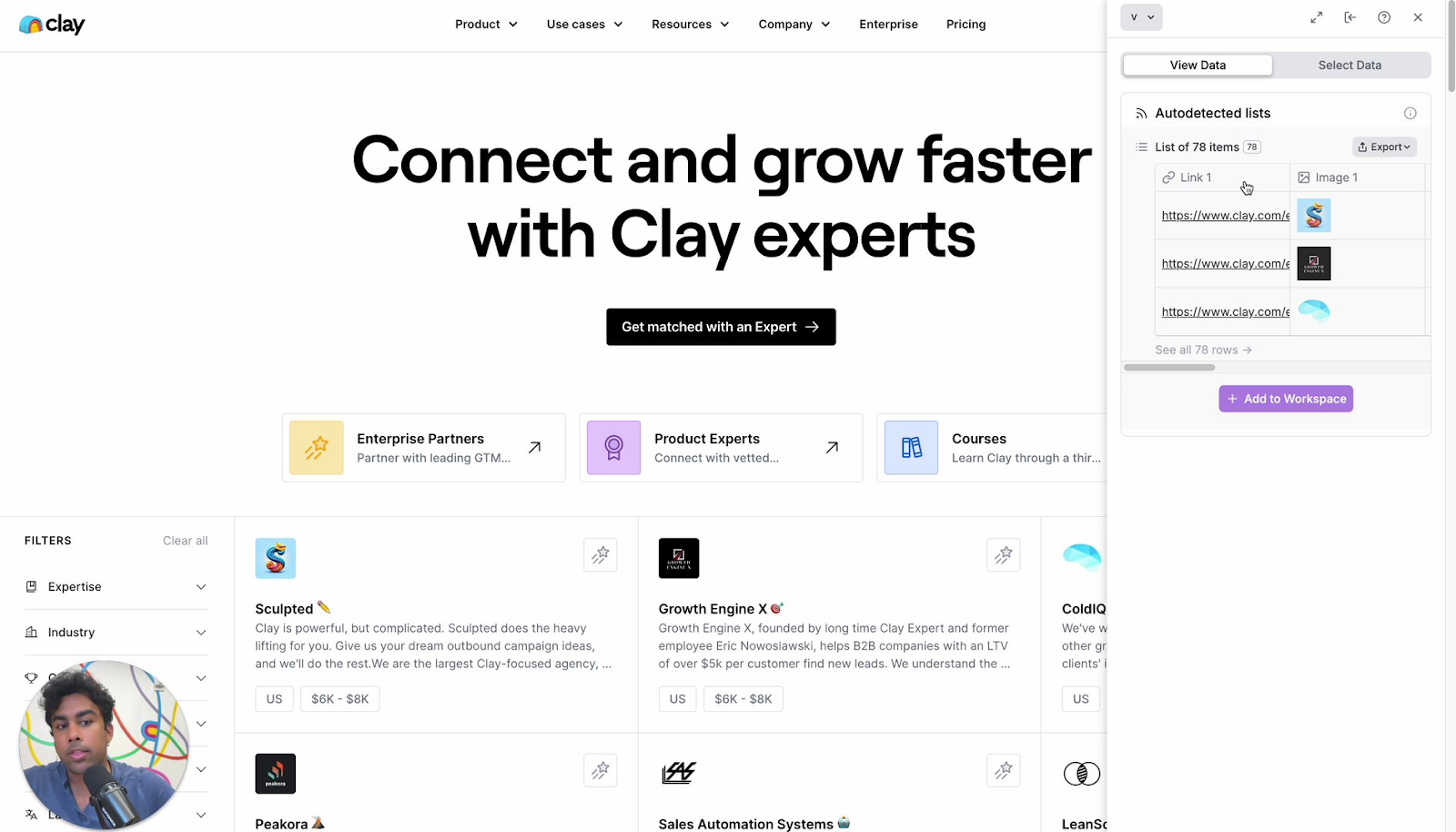
🛠️ Creating Custom Recipes
But what if the auto-detect doesn't quite hit the mark? No worries! We've built in the ability to create custom recipes. Here's how:
- Navigate to the "Select Data" option
- Create a new recipe (let's call it "ClayU Test Experts Recipe")
- Set the URL pattern (e.g., clay.com/expert)
- Select the data you want to scrape
When selecting data, our extension guides you through the process. You'll click on two items inside the list you want to scrape, and voila! The list selector pops up automatically. From there, you can choose specific attributes like agency name, location, average cost, and description.
As you add these attributes, you'll see a preview of your scraped data in a neat, tabular format. Once you're satisfied, save your recipe, and you're ready to add this data to your workspace.

📊 From Web to Workspace: Your Data Journey
With your recipe saved, adding the scraped data to your workspace is just a click away. A new tab will open, presenting you with a ready-made table filled with all the agency information you specified. This table serves as a powerful starting point for further analysis and action.
🔮 Unlocking New Possibilities
Now that you have this structured data in Clay, the possibilities are endless. You could use Claygent to look up these agency names, analyze costs, or dig into the descriptions to identify specific services. This approach isn't limited to agency directories—imagine applying this to competitor pages, case studies, or even conference attendee lists.
By mastering the Clay Chrome extension, you're able to transform unstructured web data into actionable insights within your Clay workspace. Whether you're sourcing leads, conducting market research, or building comprehensive databases, this tool empowers you to work smarter, not harder.
Remember, the web is full of valuable data just waiting to be structured and analyzed. With Clay's Chrome extension in your toolkit, you're well-equipped to capture, organize, and leverage that information to drive your business forward. Happy scraping!
