




We developed a rigorous testing protocol to reveal each email provider's specialties. Here are the providers we put to the test:
- Dropcontact
- Findymail
- Hunter
- LeadMagic
- Bytemine
- People Data Labs
- RocketReach
- Wiza
- Icy Peas
- Datagma
- Prospeo
- Snov
Let's break down our testing methodology step by step.
Step 1: Building a robust dataset
We built two testing environments to evaluate how providers perform across different business segments: SMBs and enterprises. For this analysis, we defined SMBs as businesses with fewer than 500 employees, and enterprises as those with more than 500 employees.
In our SMB analysis, we compiled a dataset of 1,075 professional contacts. Given that SMBs typically maintain simpler organizational structures and have more straightforward email domains, we focused our evaluation on data quality and coverage.
Enterprise testing proved a bit more complex. We started with 719 professional contacts, but quickly realized we needed a larger dataset to address enterprise-specific challenges. For instance, enterprise environments involve multiple email domains, complex organizational structures, and many employees with similar names. So we added 3,000 more contacts to our test set, which helped us identify critical issues like:
- Duplicate emails assigned to different people
- Mismatched domains across sub-organizations and regions
- Confusion between subsidiary and parent company domains
This extensive dataset was crucial for understanding how each provider handles ingrained challenges across different business segments.
Step 2: Assigning each provider a confidence score
We started with the most definitive test of email accuracy: did the right person actually respond? After all, an email address holds little value for outreach campaigns if it never generates a response.
With this in mind, we matched each of the email addresses in our dataset against confirmed replies. However, we knew response data alone wouldn't give us the full picture.
Here’s why: Professionals often maintain multiple valid work email addresses that route to the same inbox. For instance, a marketing director might be reachable through several different email addresses, whether it’s their main email, an email alias with only their first name, or an email address from the company’s old domain. For us at Clay, this would look like:
- first.last@clay.com (main email)
- first@clay.com (alias)
- first.last@clay.run (legacy domain)
- first@clay.run (legacy alias)
To account for this complexity, we developed an additional verification system that analyzes email prefixes, company domains, and more.
Prefix verification
We crafted an Anthropic prompt to check that each email prefix logically matched each contact’s first name and last name. Anthropic evaluated each email prefix, and responded with:
- “Yes” for possible matches
- “No” for clear mismatches
Here’s what the AI formula looked like in our Clay table:
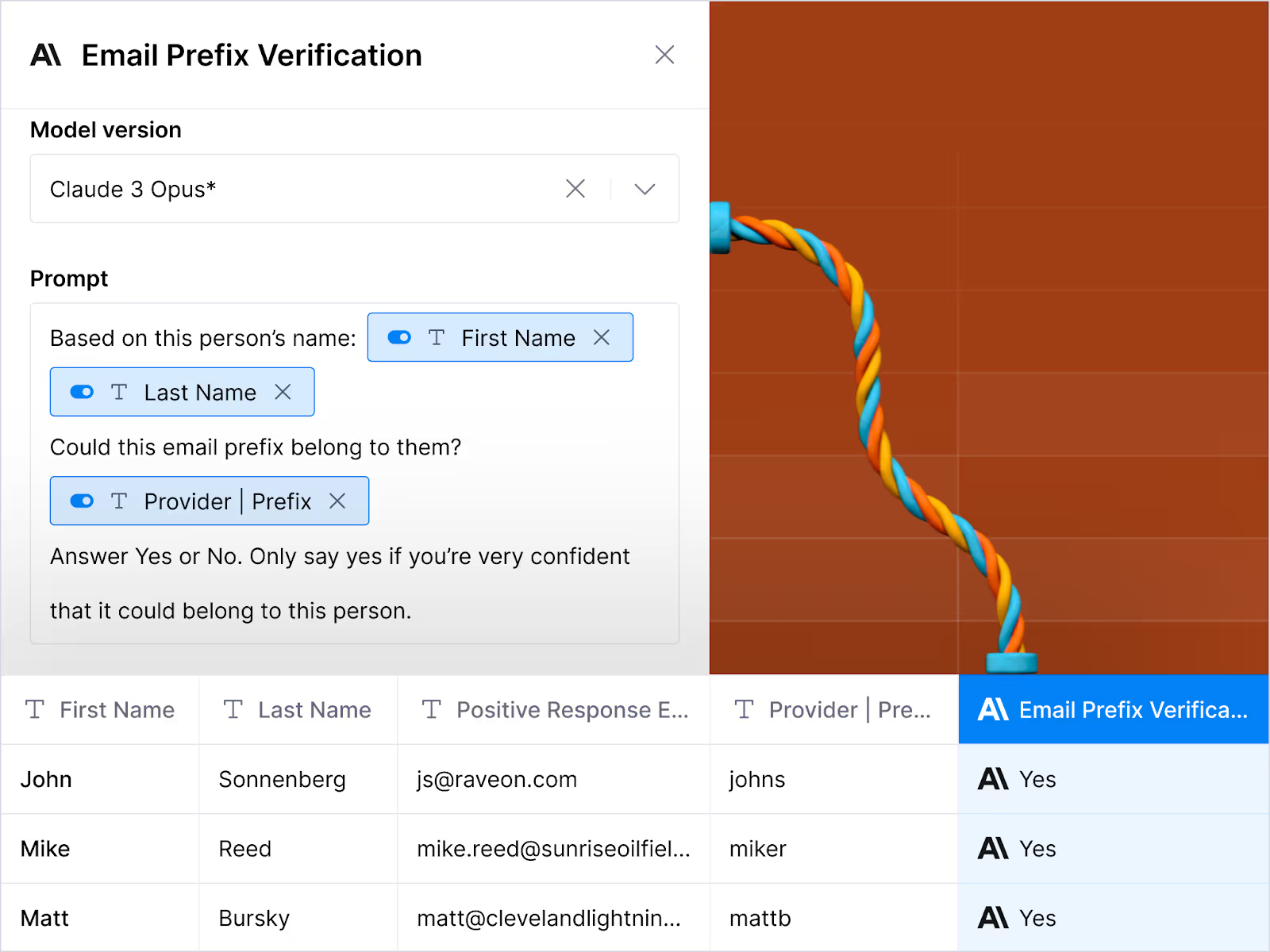
This extra layer of validation helped us to identify duplicate emails, thereby reducing the source bias of our initial dataset.
Domain search & validation
We also used Claygent (Clay’s AI-powered research agent) to compare email domains against company websites. Echoing our use of Anthropic, we asked Claygent to evaluate each email and provide one of two responses:
- “Yes” for likely matches
- “No” for mismatches or incorrect findings
Here’s what Clay’s reasoning looks like:
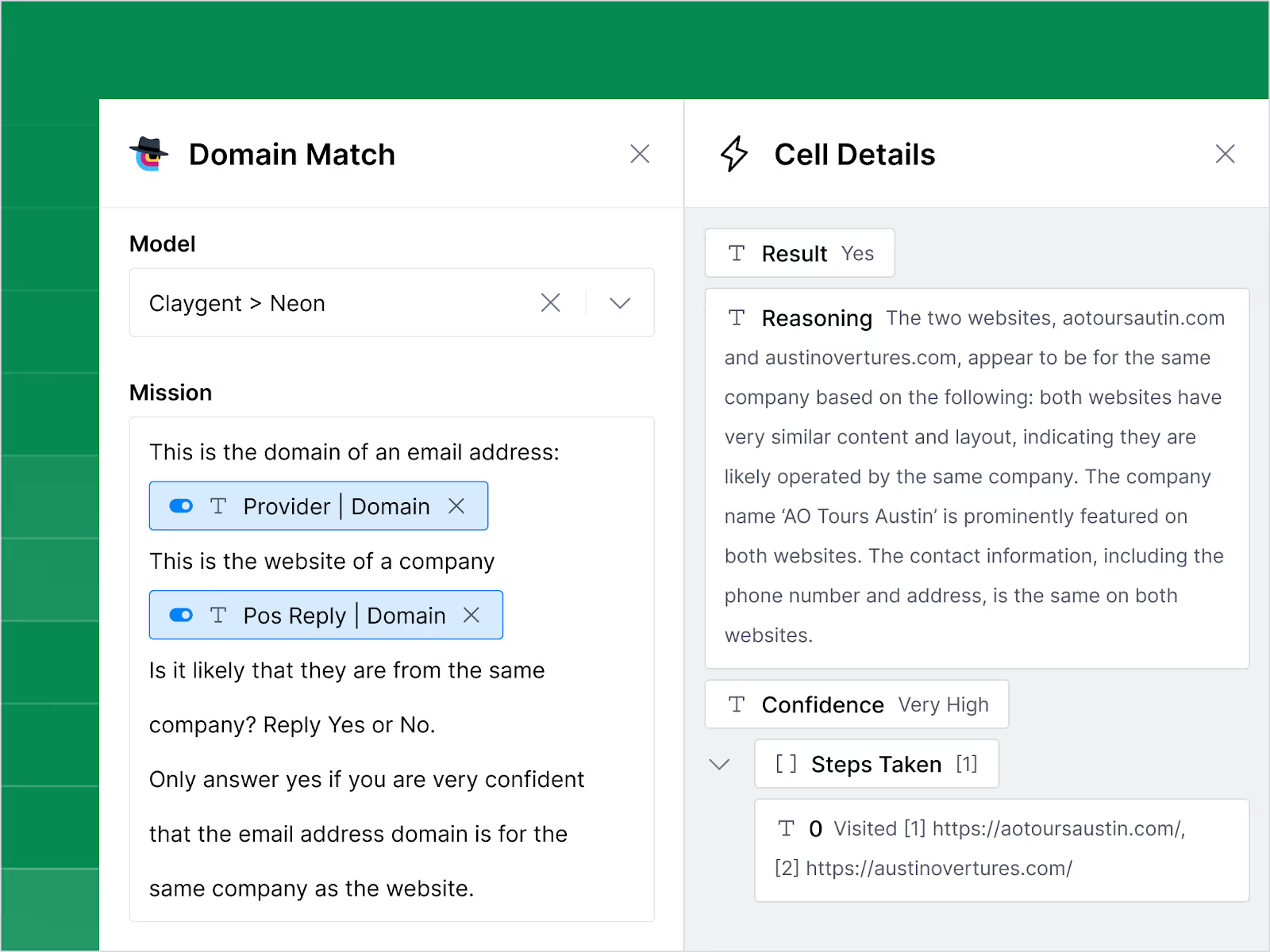
This system helped us to collect all valid email addresses across a company with multiple domains. For example, if an employee could receive mail at both “first.last@clay.com” and “first.last@clay.run,” we were able to capture both email addresses.
Final confirmation with Instantly
We partnered with Instantly to verify email deliverability using their patented three-step process:
- Validate email addresses using standard protocols
- Identify risky email addresses and catch-all domains
- Cross-check email addresses against Instantly’s vast database, which is comprised of hundreds of millions of contacts
This final step proved crucial, as Instantly caught several email addresses that standard verification services may have missed.
💡Pro tip: Traditional email verification tools often miss catch-all and junk emails, which can make up to 50% of your lead lists. However, Clay integrates directly with Instantly, so that you can optimize your email verification process without so much as needing to leave your Clay table.
Deliverability confidence
Our confidence-based scoring system evaluated the likelihood that an email would reach its target inbox. Here’s a closer look at how we defined each tier:
- 100% confidence: We received a positive response from the contact.
- 80% confidence: The email address passed Instantly's verification system.
- 0% confidence: The email address was confirmed undeliverable.
With this scoring system, we can more accurately predict if an email will reach its intended recipient.
Correct person confidence
Next up, we needed to measure the probability that a given email address was owned by the right person. For example, if we were searching for Jane Smith at Acme Corp, we’d need to confirm that jane.smith@acme.com actually belongs to 1). Someone named Jane Smith, 2). The right Jane Smith at Acme Corp, if there were multiple people with the name Jane Smith.
Here's how we scored each match:
- 100% confidence: Contact responded to confirm their identity.
- 80% confidence: Either the prefix or domain matched perfectly, but not both.
- 60% confidence: Both the prefix and domain showed potential matches.
- 0% confidence: Neither prefix nor domain matched our verification criteria.
In short, this system helped us determine which providers consistently matched emails to the right contacts.
Overall confidence score
Our final confidence score brings together every aspect of our testing. Here's the complete breakdown:
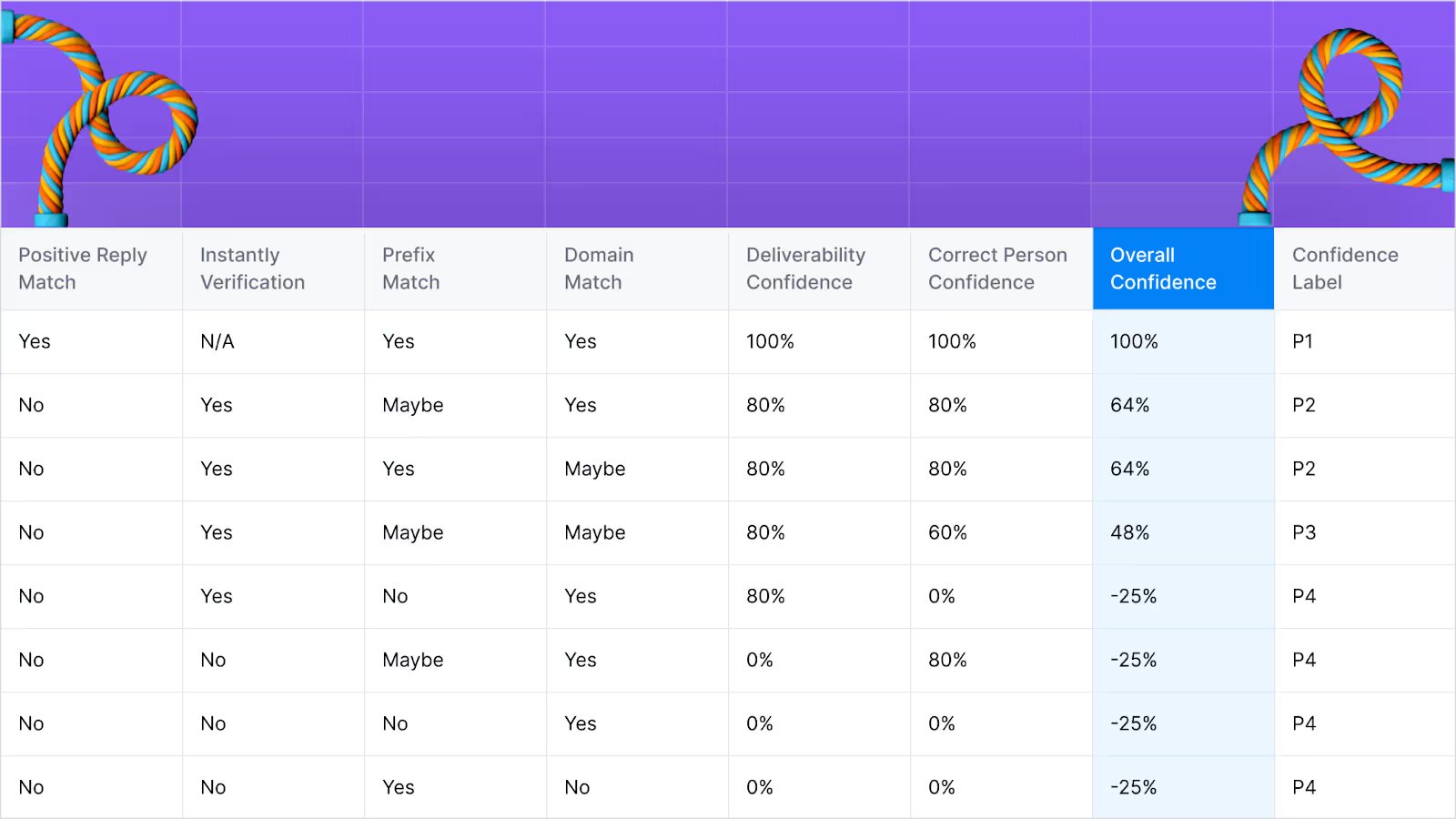
A few important notes about our scoring system:
- We don't run P1 emails through Instantly verification. After all, a direct response from the right contact is the strongest form of validation possible. In line with this, emails that are confirmed as “undeliverable” don’t require Instantly verification either.
- Providers’ overall confidence scores can drop as low as -25% when they deliver incorrect emails. Why? Because we consider incorrect emails to be more harmful to your outreach efforts than not finding an email at all.
Step 3: Evaluating the cost per verified email
For sales teams looking to optimize their budgets, the first step is to stop paying for unverified or unresponsive email addresses. This is precisely why we calculated the cost per verified email (with P1, P2, and P3 confidence labels), according to the Clay credits you’d need to purchase them.
However, while cost is a significant factor, it shouldn’t be the only consideration in budget planning. For example, if a sales team is working with a list of unverified email addresses, they could be wasting valuable time on dead-end outreach. With this in mind, we also accounted for potential time savings in our cost analysis.
Explore other docs
Other popular resources
Join a cohort, learn Clay fast!
The faster way to master Clay. Sign in if you're enrolled in a cohort (current or past) or apply!
Hire GTME Talent
Find and connect with GTM talent who've demonstrated expertise in building advanced workflows