

What are Clay credits?
Clay credits are the “currency” used to run actions that access data endpoints in Clay. Depending on your Clay plan, your account is allocated a set number of credits monthly or annually, which you can use to enrich your workflows.
Each time you run an action to enrich data, credits are used. For instance, if enrich a contact on a regular cadence, credits will be consumed every time the action runs.
Credit costs overview
Integrations in Clay fall into two main categories: GTM system tools and data providers.
Actions tied to GTM system tools—such as CRM actions and sequencer actions—do not require credits. However, to access these integrations, you must be on a paid plan.
For data enrichments, the credit cost of a data point or action depends on the provider and the specific data. Most actions in Clay are either free or cost 1–2 credits. However, certain data points, such as mobile phone numbers, are more difficult to locate and therefore require more credits.
You can view the credit cost for each action directly in the enrichment search panel.

Add your API Keys for free
In Clay, you won’t be charged for using your own API key or HTTP/API integration. With no additional credit cost, you can:
- Add your own API key to create an integration account within an action
- Run custom HTTP/API actions
However, to use your own API key, you must be on a paid plan.
Enrich people and companies for a fixed cost
Clay’s datasets include a comprehensive library of over 500 million people and 60 million companies, allowing you to enrich data efficiently without incurring additional credit costs under certain plans.
Actions that don’t cost credits
There are many actions within Clay that don’t require credits. For example, you can use the HTTP/API integration for free tool generate meeting notes. Check out this Claybook guide for more information on how to do so!
Below are some of the most common actions do not require credits:
- Find Company source
- Find People source
- Building lists from Google Maps
- Building lists from GitHub
- Building lists from CRMs
- Building lists from websites
- Write to Other Table
- HTTP/API
- Normalize Domain
View credit consumption
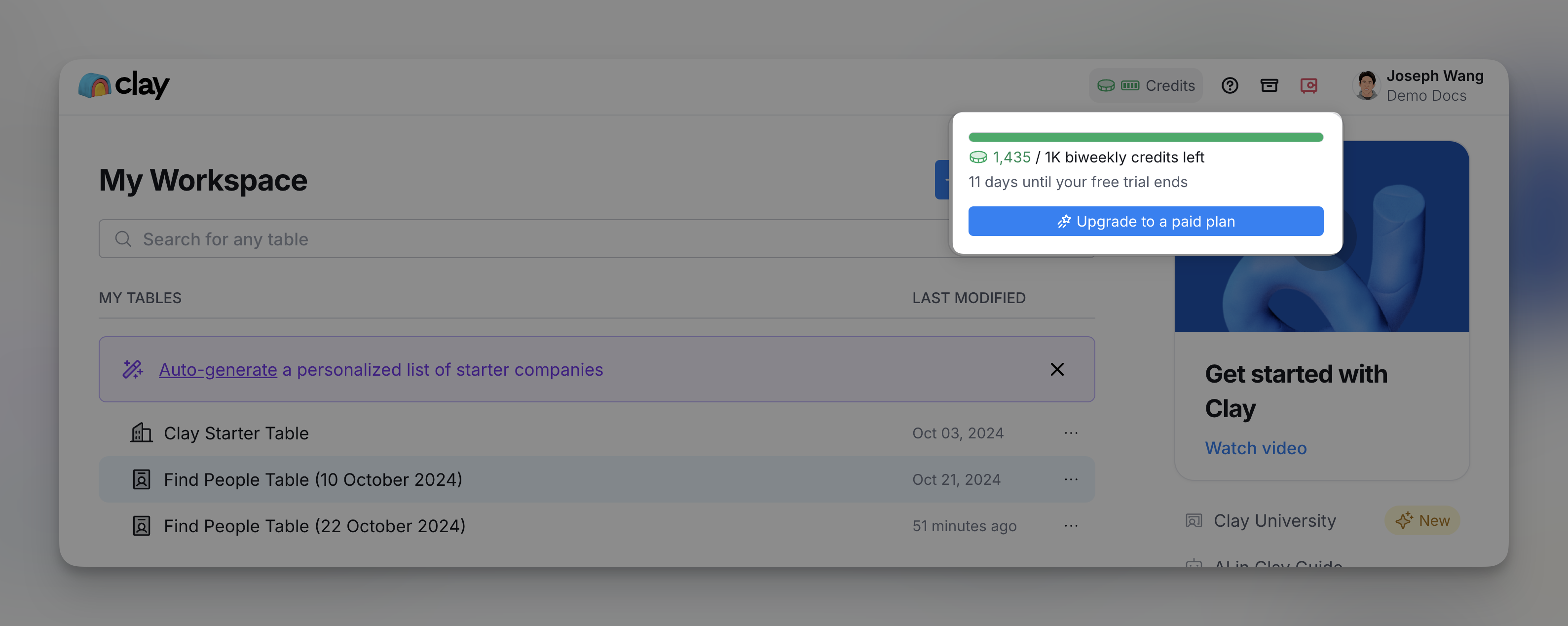
For more information on your credit consumption, you can hover over to the top navigation bar and click on Credits.
Conserve Clay credits
For more information on how to make the most out of your Clay credits, feel free to check out this guide on saving Clay credits.
Roll over unused monthly credits
If you are on a monthly plan, unused credits will roll over and accumulate in your account. The accumulation is capped at 2x the monthly credit limit according to your plan.
For example, if you are on a pro plan (50,000 credits/month), the monthly credit cap is set at 100,000.
Purchase additional credits
To purchase more for a particular month:
- Go to Workspace Settings > Plans and Billing > Purchase Credits
- Select the amount needed and click Continue.
Upgrade your Plan
If you foresee an ongoing increase in credit usage:
- Go to Workspace Settings > Plans and Billing > Change Plan
- Select the next tier in your pricing plan.
- Click Upgrade Plan.
FAQ
What happens to my credits when I downgrade?
There are two important things to know on how your credits are managed when you cancel/downgrade your subscription.
- During the Current Billing Cycle:
- If you cancel or downgrade, your credit balance remains on your account until the end of your current billing cycle.
- On the Next Billing Cycle:
- After the billing cycle refreshes, your account will switch to the new plan.
- Your credit balance will be capped at 2x the monthly credit limit of the new plan
- Example: If you cancel today, and the new plan's monthly credit limit is 100, your credit balance on the next billing date will be capped at 200
I got invalid data, do I get a refund?
If a provider charges us for an API call, we will also charge Clay credits for that call. However, if a provider refunds us due to the inability to deliver valid data, we will correspondingly refund those credits back to you.
My plan was supposed to renew today, and I can see the transaction in my account, but the credits haven’t been added. What’s happening?
If your Clay plan renewed but credits haven’t been added, it may take 1-2 hours due to transaction processing.
This delay is due to how our card provider processes transactions. If you made your purchase at 12 PM, for example, your credits might not be reflected until 1 PM. With each renewal, it may take 1-2 hours after your original billing time for the credits to appear in your account. Rest assured, your credits will be added shortly.
If you continue to experience issues after this period, please reach out to our support team for assistance.
How long is my enrichment data good for?
Enrichment data is retrieved directly from the provider at the time the action is run. Every time you run an action, credits will be used.
Explore other docs
Other popular resources
Join a cohort, learn Clay fast!
The faster way to master Clay. Sign in if you're enrolled in a cohort (current or past) or apply to an upcoming one!